Cubrin Usernames Are Here — Find Friends, Split Bills & Chat With Just a @Handle
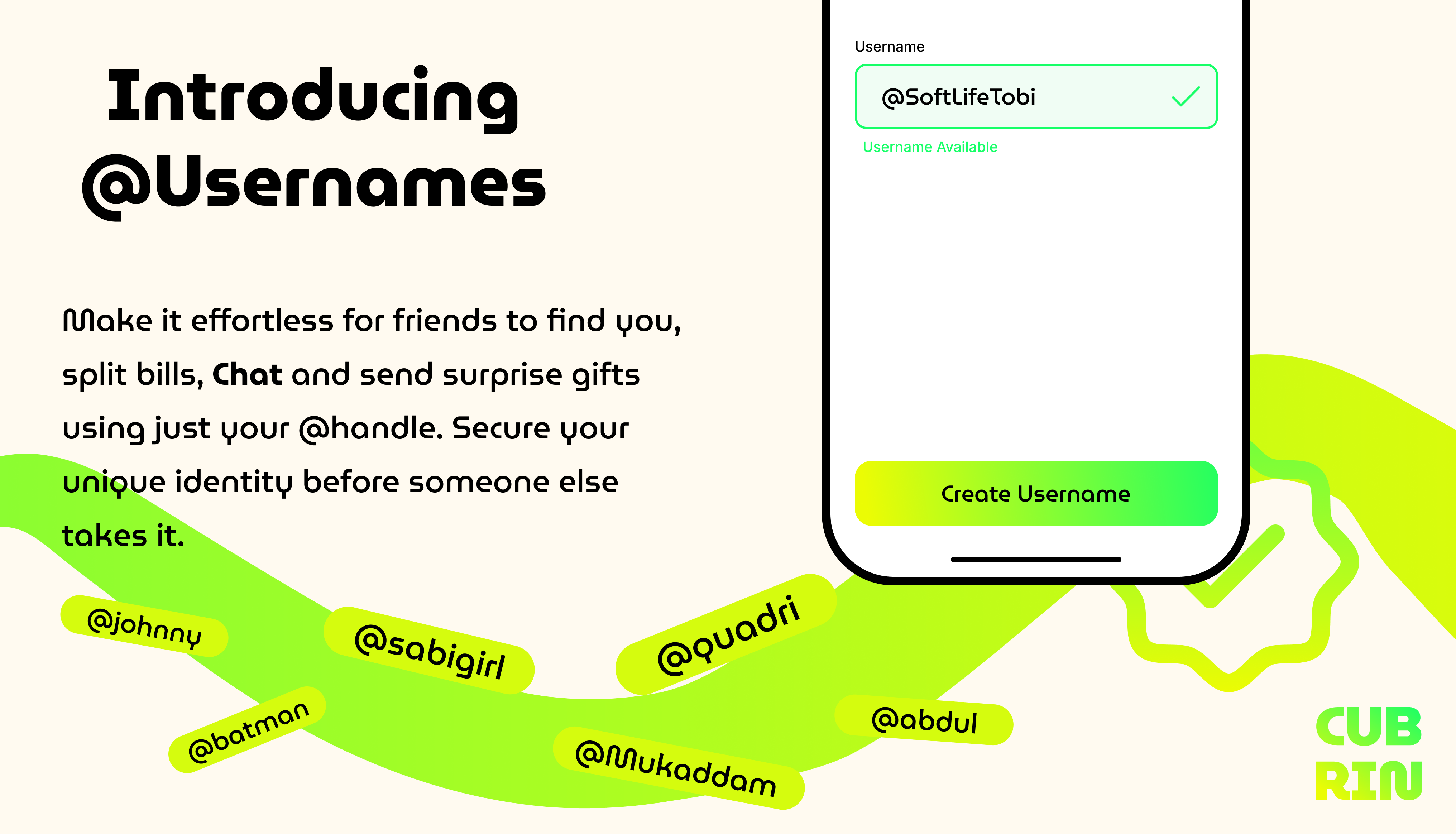
Cubrin just got a whole lot more social. Starting today, every user gets their own unique @username — a single handle you can share with friends, use to split bills, chat with vendors, and send surprise gifts. No more asking for phone numbers. No more long account details. Just your handle.
Here's everything you need to know about the biggest update to Cubrin this year.
What Just Launched: Cubrin Usernames
We've added a new layer of identity to the Cubrin app: @usernames. Think of it like your social handle — but built specifically for hyperlocal shopping, chatting, and money transfers with people nearby.
Your Cubrin username is:
- Unique — no two users can have the same handle
- Public — so friends and vendors can find you easily
- Safe — your phone number and email stay private
- Permanent — once you set it, it's locked to you forever
That last point matters. Once you claim your username, it's yours. No one else can take it, impersonate you, or register it later. Which is exactly why you should claim yours today.
Why We Built Usernames on Cubrin
Cubrin has always been about community — from splitting lunch with roommates to ordering snacks with your hostel mates. But as our user base grew across Lagos, we noticed a real problem:
Sharing your identity was awkward.
Sending money meant giving out long account numbers. Adding friends meant exchanging phone numbers (too personal). Finding someone you met at a food fair was nearly impossible unless you swapped contacts on the spot.
Usernames fix all of that. Short, memorable, and safe — the perfect middle ground between anonymity and full identification. Whether you're on a campus in Yaba, a hostel in Akoka, or a new neighborhood in Lagos, your Cubrin @handle is now the easiest way to say "let's link up."
How to Claim Your Cubrin Username (Step-by-Step)
Setting up your username takes under 30 seconds. Here's the exact flow.
Step 1 — Open your profile settings
From the Cubrin home screen, tap your profile picture at the top. You'll land on a settings menu with options like "Name & Username," "My contacts," "Delivery address," and "Update password."
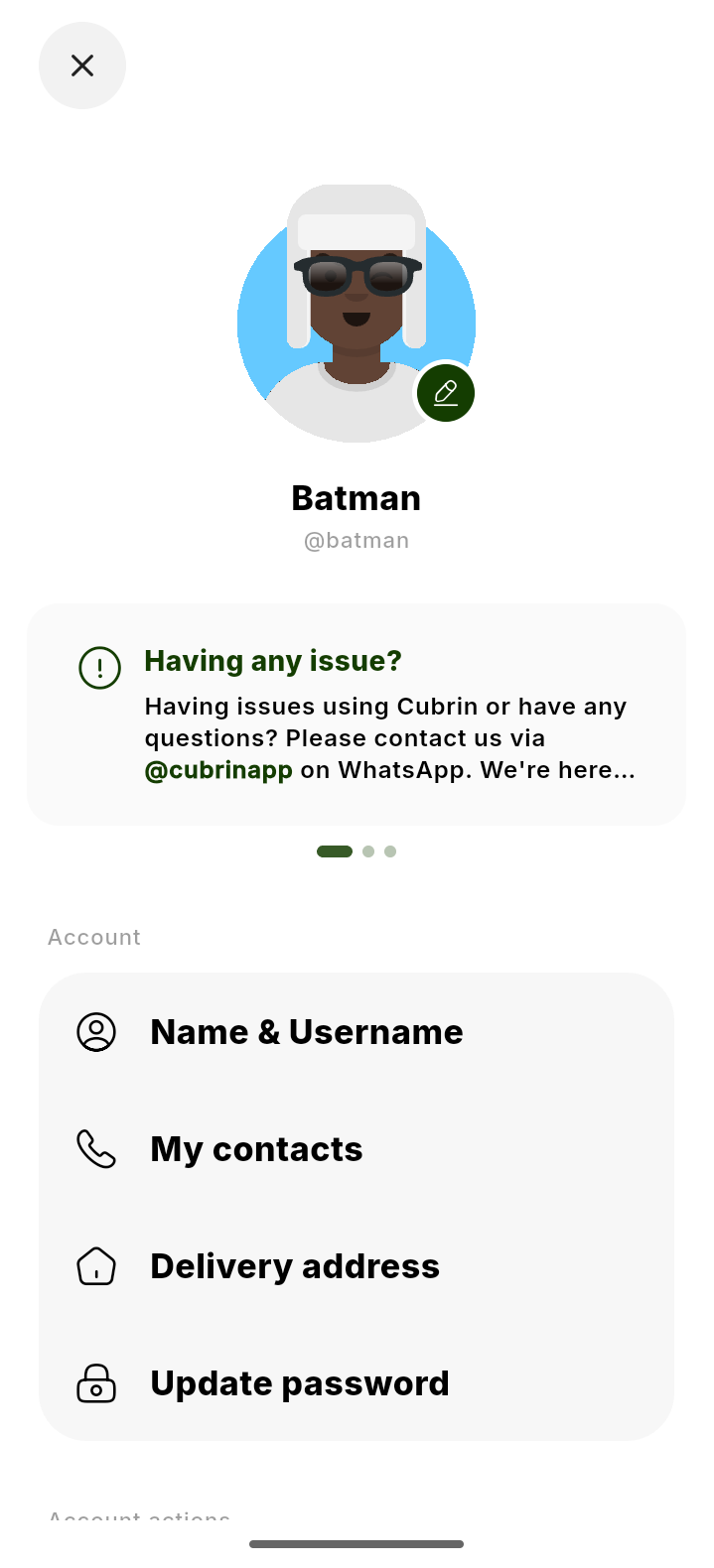
Step 2 — Tap "Name & Username"
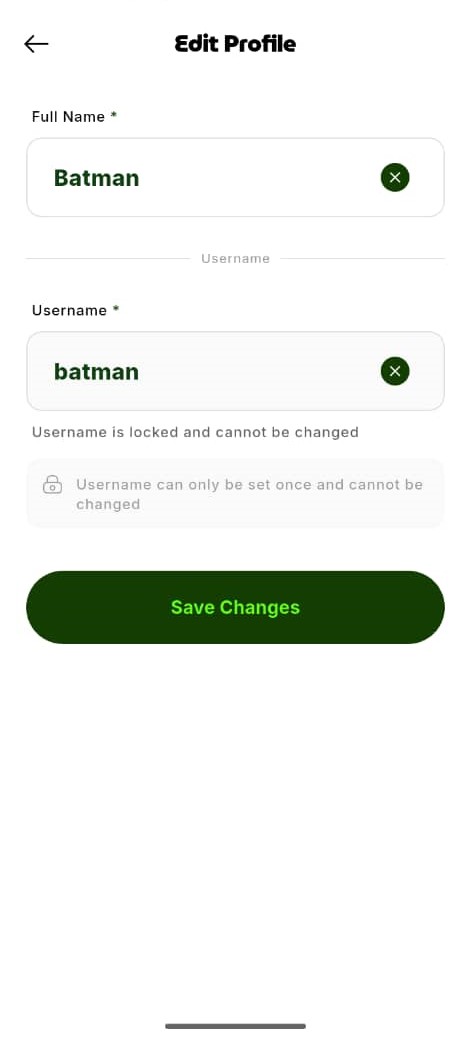
This takes you to the Edit Profile screen, where you'll see two fields:
- Full Name — your display name (like "Batman" in the example below)
- Username — your unique @handle (like "batman")
Type your chosen username. It has to be unique. If it's already taken, try a variation.
Step 3 — Save Changes
Tap Save Changes and you're done. Your @handle is now live across Cubrin — visible on your profile, searchable, and ready to be shared with anyone.
Heads up: your username can only be set once. That's why the screen shows "Username is locked and cannot be changed." Choose carefully — this is your permanent Cubrin identity.
5 Fun Ways to Use Your New Cubrin @handle
Now that everyone has a handle, here's how people are already using them:
1. Met someone new? Ask for their Cubrin.
You're at a hangout, you vibe with someone, you want to stay in touch. Instead of the awkward "uh, let me get your number…" — just say: "What's your Cubrin?"
No phone number exchange. No pressure. Just a handle.
2. Split bills without the drama
Ordering with friends? Instead of asking everyone to send money to your bank account, add them to your cart's Split Bill list using their @handle. They see the amount, approve it, and the order goes through.
3. Send a gift to a friend's order
Your friend is about to check out but their wallet is low? Search their username, top up their balance, or pay for part of their cart — all in one tap.
4. Chat with any vendor
Every vendor on Cubrin has a handle too. Want to negotiate a price, ask about stock, or request a custom order? Just DM their @handle. It's like WhatsApp, but built for shopping.
5. Build your campus rep
Popular vendors, ambassadors, and friendly faces become easier to find when they have memorable usernames. Build your own reputation with a handle people remember.
The New Icebreaker: "What's Your Cubrin?"
We have a strong feeling this phrase will catch on fast — especially on Nigerian campuses. Whether you're meeting someone at a food fair, a hostel party, or a study group, your Cubrin username is now the easiest way to stay connected.
No phone numbers. No bank details. Just your handle.
Frequently Asked Questions About Cubrin Usernames
Are Cubrin usernames free?
Yes — completely free. Every Cubrin user gets one username at no cost. There's no premium tier or paid reservation.
Can someone else take my name?
If you haven't claimed it yet, yes. Usernames are first-come, first-served. If you have a name in mind, lock it in now before someone else does.
Can I change my username later?
No. Once you set your Cubrin username, it's permanently locked to your account. This prevents impersonation and keeps the platform safe for everyone. Choose carefully before you save.
Is my username visible to everyone?
Yes — that's the point. Your username is public so friends, vendors, and other Cubrin users can find you. Your phone number and email stay completely private.
How do I find someone on Cubrin using their username?
Open the search bar on the home screen, type in their @handle, and their profile appears. Tap to connect.
What happens to my old account info?
Nothing changes — you keep all your orders, chats, wallet balance, and contacts. The username is simply an additional way to identify you.
Can vendors also have usernames?
Yes — every vendor on Cubrin has a handle too. You can message them, split payments with them, and share their storefront with friends using just their @handle.
Claim Yours Before Someone Else Does
Usernames are going fast — especially the good ones. The earlier you claim, the more likely you'll get the exact handle you want.
Open the Cubrin app, tap your profile, and lock in your @handle today.
Already have the app? Just open it and claim your username in under 30 seconds.